One Click to M365 Security
Just log into your Microsoft account and we’ll take care of the rest!It’s just one click to go beyond the included Microsoft 365, Defender for Office 365, Entra, and Azure notifications and monitoring.
Lavawall® processes the complex Entra ID logs, correlates the data with your known workstations to reduce false positives, and gives actionable notifications that keep your clients safe while saving you a lot of time and money!
What does Lavawall® check in Microsoft 365, Entra, and Azure?
Lavawall® considers where you have computers and things like IPv6 privacy so you don’t have the false positives that plague Microsoft’s built-in tools and most other third-party tools.While preventing false positives, Lavawall®'s comprehensive ITDR (Identity Threat Detection & Response) approach looks at an ever-expanding list of risk indicators, including:
- Potential breaches determined by analyzing a combination of indicators
- Changes to mail accounts, like setting up mail forwarding, and suspicious mailbox rules
- Suspicious login patterns and logins from weird locations
- Logins from more than one location
- Impossibly fast travel between two different locations (Microsoft Entra does this with “Risky Users.&rsquo Lavawall® uses much more accurate location data and displays actual speed and distance for you to get the full picture
- Credential stuffing attacks
- Brute force attacks
- Password Spray Attacks
- MFA Bombing
- MFA Fatigue
- Session hijacking
- Lateral movement
- Newly-installed and risky Entra and Azure Apps
- Dormant account reactivation
- Activity on disabled accounts
- Failed MFA and MFA abuse
- Risky Events
- Security Alerts
- Malicious addresses
- Unusual file download, deletion, sharing activities
- Unusual mail access and configurations
- Privilege escalation
- Activity after hours
- Much more...
Your Microsoft® security score is useful; however, real security goes much deeper. Lavawall® also considers:
- Multi-Factor Authentication strength
- Inactive account monitoring
- External accounts
- Legacy authentication
- Computers that are in Lavawall®, but missing from Intune and vice versa
- Unmanaged devices
- M365 and Entra license utilization
We also look at potential administrator abuses, such as:
- Privilege Escalation
- Self-Privilege Escalation
- Mailbox Permission Change
- User dumping
Microsoft 365 / Entra / Azure Dashboard
It’s time to get a quick view of your clients’ Microsoft 365 risks without the noise and false positive in other ITDR (Identity Threat Detection & Response) tools.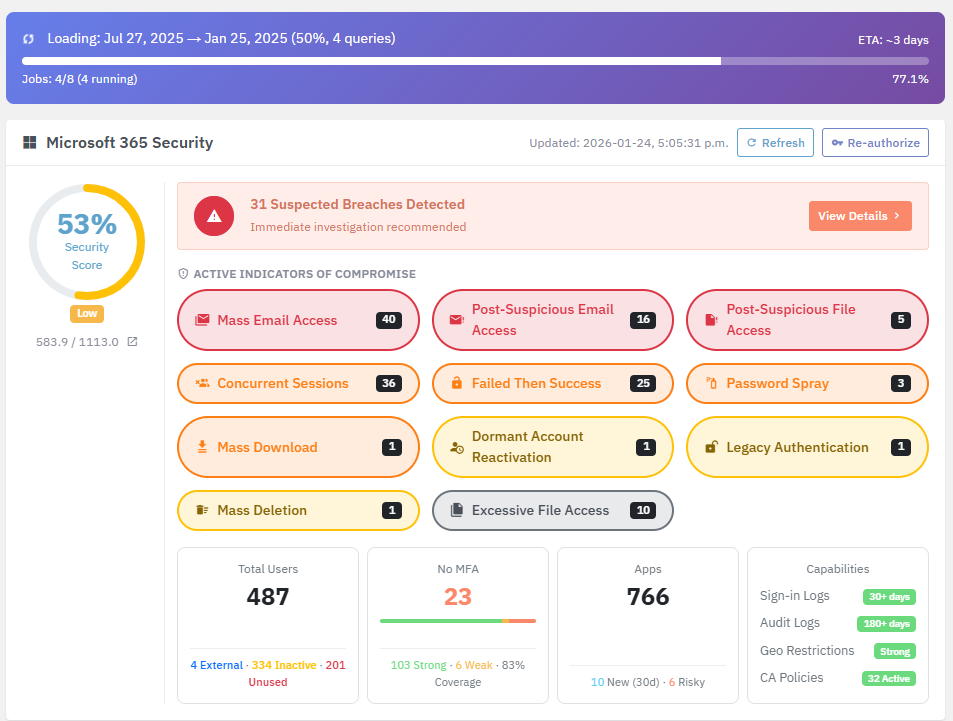
Click any of the summaries for details like this:
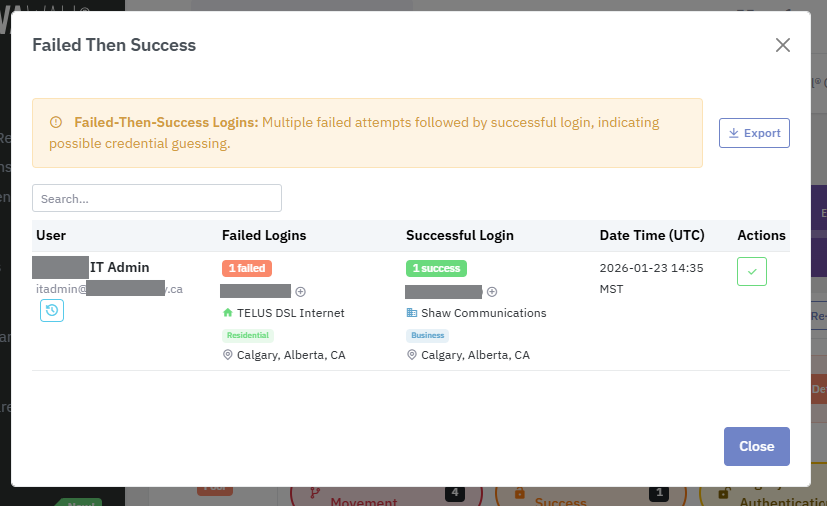
Note: Computers running the Lavawall® agents for Windows, Mac, or Linux are automatically excluded from login sequences that include a failed login and an unknown successful login location. This significantly cuts down false positives.
YOu can also click the plus icon to add IP addresses to trusted location lists.
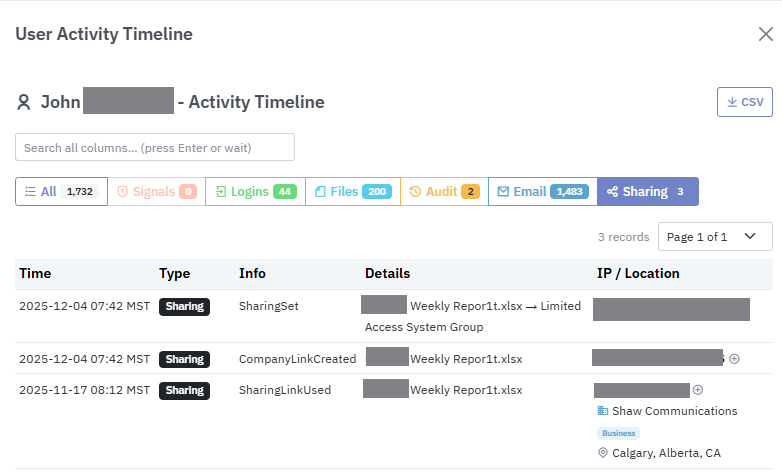
Click the timeline icon to see details about a specific user including:
- All Microsoft 365, Entra, and Azure activity
- Indicators of Compromise & Breach Signals
- Login attempts with automatically enriched data to show you the Internet Service Provider, IP type, and location
- File access activity in OneDrive, SharePoint, and Teams
- Email access activity
- Sharing activity
- Report-only first. Start in report-only mode to see who would have been blocked, then switch to enforce when you are happy with the results.
- Travel exceptions for one person. When someone travels, add their trip with the countries and dates. The countries open for that person only, from their first day to their last, and close again on their own.
- Break-glass accounts. Choose emergency accounts that are never blocked by these policies, so a mistake cannot lock everyone out. Enforcement stays off until at least one is set and enabled.
- Tor exit nodes. Optionally block sign-ins from the Tor network, kept current from the Tor Project’s published list.
- Kept the way you set it. If someone changes or deletes these policies in the Microsoft admin centre, Lavawall® puts them back the next time it checks.
- Add them as a client in Lavawall
(On the left side, under Client Orgs, click Add, fill out the information and click Create Organization - If necessary, select the client name from the top client drop-down menu.
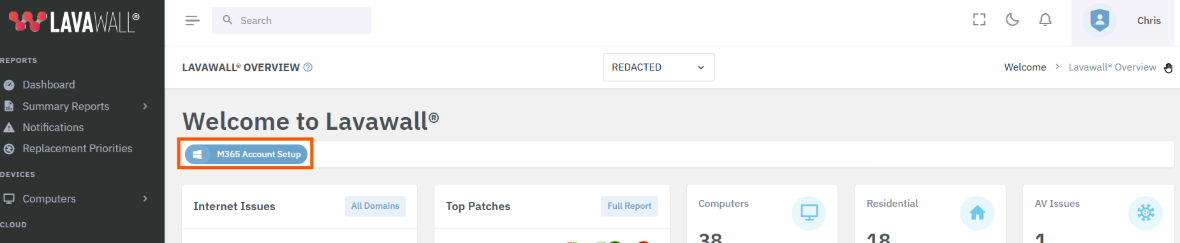
- Click M365 Account Setup at the top of the dashboard (in the orange rectangle below
- Login to Microsoft 365 and approve the read-only security permissions.
- Within a few minutes, we’ll analyze M365 and Azure logs, mail rules, Intune, Entra ID settings, and other indicators of compromise.
A summary will quickly appear on the dashboard with details for each available in Lavawall®'s Microsoft 365 Security and Breach system.
Remove a phishing email from every mailbox
When one person reports a phishing email, others usually received it too. Search for it by sender, sending domain, subject, or sending IP address, in one Microsoft 365 tenant or across every client you manage. Lavawall® shows you each message it found and whose mailbox it is in. You choose which messages to act on, then move them to Junk, move them to Deleted Items, or purge them so they cannot be recovered. Nothing is removed until you approve it, and permanent purges ask you to confirm twice.
Every search and every removal is recorded with who asked for it, so you can show your client exactly what was done and when.
Block sign-ins from countries your client does not work in
Most businesses sign in from a handful of countries. Lavawall® looks at your client’s successful sign-ins over the last 90 days and proposes the countries they really work from. Failed sign-ins are left out, so an attacker’s attempts never make their country look normal. You review the list, then Lavawall® sets up and maintains the Microsoft Entra Conditional Access policy that blocks sign-ins from everywhere else.
Conditional Access needs Microsoft Entra ID P1 or higher, which is included in Microsoft 365 Business Premium.
What should an MSP do with a new client who had an Office 365, Microsoft 365, or Azure Breach?
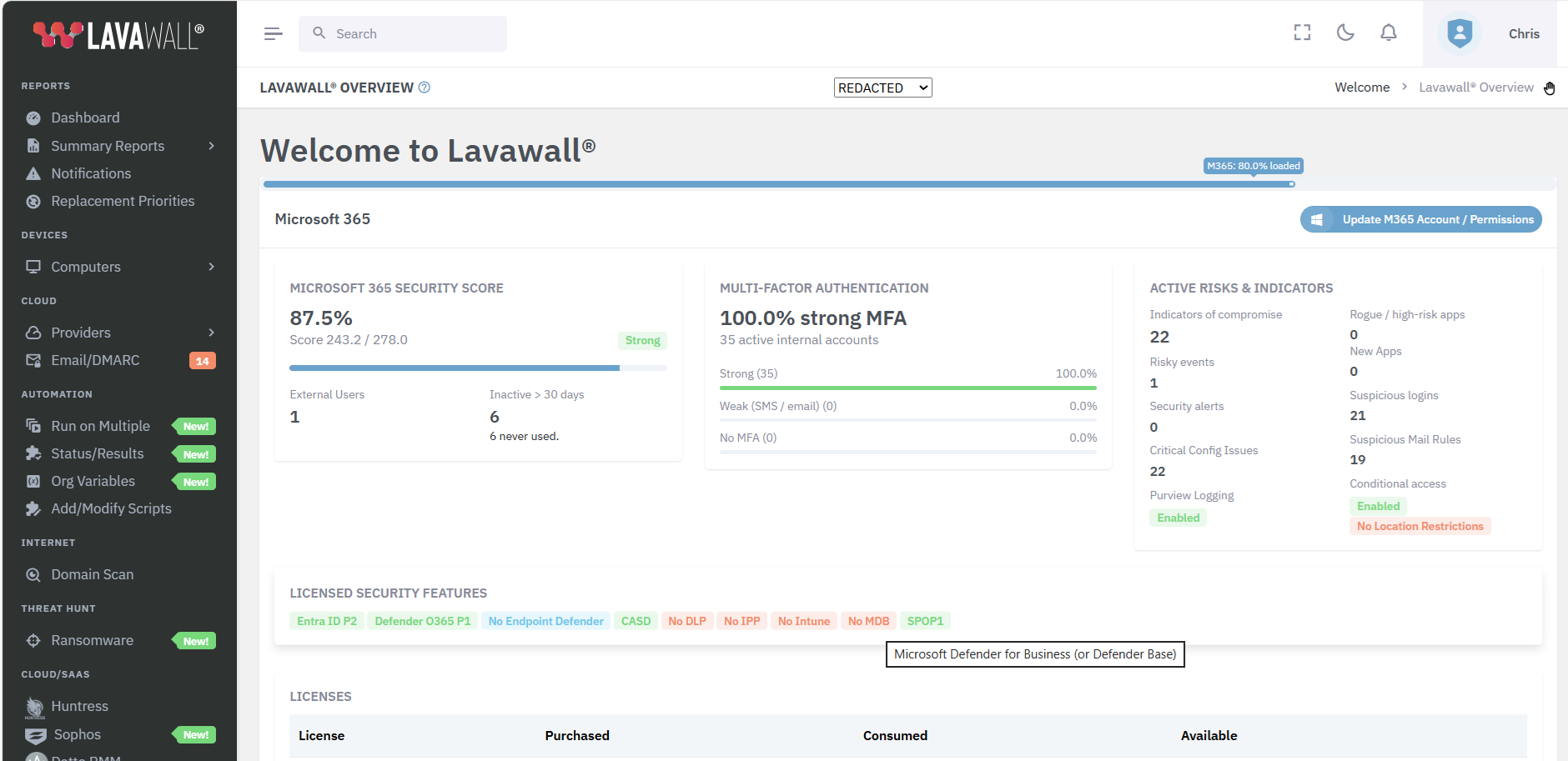
Yes, it’s really just a one-click (plus login) setup to immediately learn if, how, and when your Microsoft 365 tenant was breached!
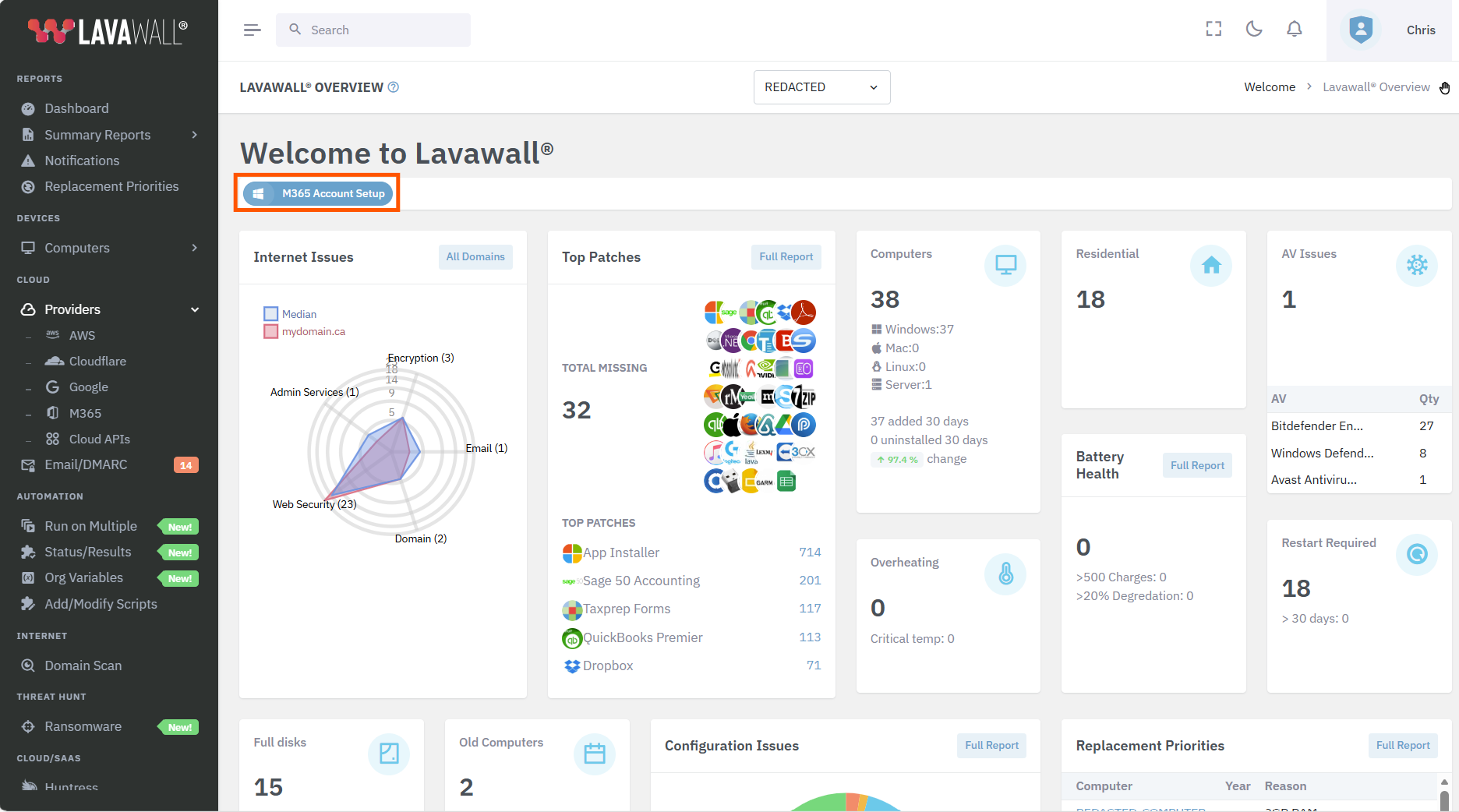
While Lavawall® is refreshing your data, you'll see a real-time progress bar go across the top of the dashboard. This typically lasts less than 5 minutes an happens at least once per day.
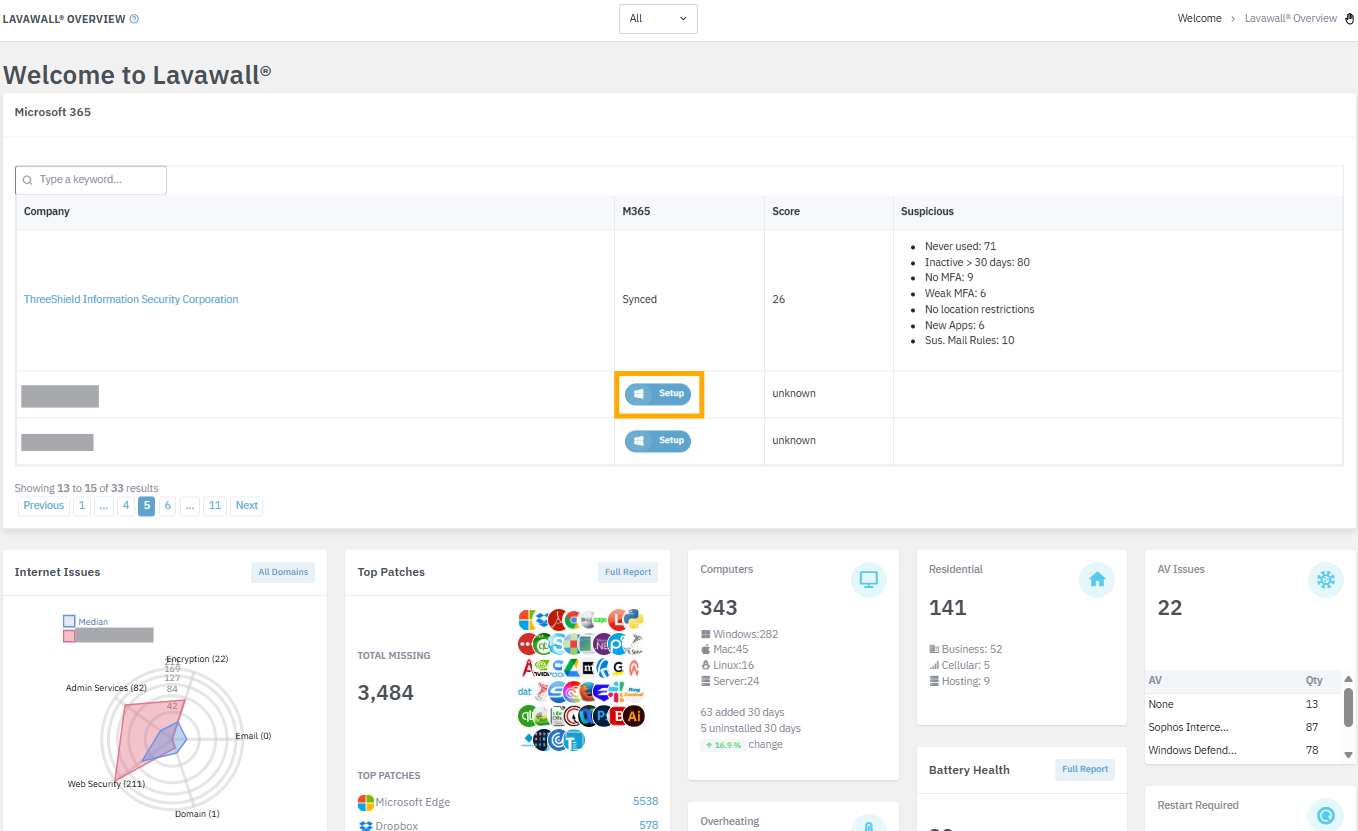
From the “All Companies” dashboard view, you can also initiate the setup by clicking the Setup button beside any companies that haven't been set up yet in the Microsoft 365 summary view. You can quickly locate the company using the search box as well.
Integrated endpoint, Active Directory, and Microsoft 365 / Entra
Lavawall® can use Intune data for refinement; however, it also correlates the Windows, Mac, and Linux data with Microsoft 365 and Entra logs as well as Active Directory logs.This allows Lavawall® to reduce false positives found in other Microsoft 365 and Entra security products like SaaS Protect, Petra, and Inforcer.
It also allows you to see truly inactive accounts in Hybrid Active Directory / Entra setups, where some users login on-premise and others are fully remote avoid accidental lockouts with tools like Netwrix.

If you have any questions or need further assistance, feel free to reach out through our chat, phone or email on our contact page!