Lavawall® DMARC Monitoring is a hosted DMARC aggregate report (rua) receiver and an automatic per-domain configuration system. Point your domain’s DMARC reports at a Lavawall address; we receive, decompress, parse, and store the XML automatically, then show you a plain-English picture of who is sending email as your domain and whether it passes SPF, DKIM, and DMARC. The configuration system reads each domain’s live _dmarc record, tells you when it is out of date, and gives you one-click safe progressions to the next policy — quarantine at 10%, then reject at 25% — with the exact TXT record written for you.
At a glance
- Managed receiver: a dedicated
@dmarc.lavawall.comaddress per company — we parse the XML so you don’t. - Automatic configuration: per-domain card detects live-DNS drift, writes the TXT record, suggests the next safe step (Set to Quarantine 10%, Skip to Reject 25%).
- Non-destructive: merges with your existing
ruareporters (Cloudflare, etc.) — never overwrites. - Source intelligence: reverse DNS + provider/ESP category on every sending IP, with a per-source analyst decision (authorize / phishing / suspicious / ignore) and full audit trail.
- Domain discovery: auto-populates from Microsoft 365, Google Workspace, and Scout.
- Multi-tenant: built for MSPs — one console, every client isolated.
Why DMARC matters — and why most people stall
DMARC is how you stop attackers from sending email that looks like it came from your domain — the spoofing behind invoice fraud, CEO/BEC scams, and credential phishing aimed at your staff and customers. Publishing a DMARC record is easy. The hard part is everything after that:
- The daily reports arrive as compressed XML from dozens of different mailbox providers — unreadable by a human.
- You can’t move to
p=rejectuntil you know every legitimate system that sends on your behalf (your mail platform, your CRM, your invoicing tool, your marketing platform, your helpdesk…). - Get it wrong and you don’t just annoy attackers — you bounce your own invoices and newsletters.
That fear is why so many domains sit at p=none forever, collecting reports nobody reads. Lavawall is built to get you off p=none — safely — with an automatic configuration system that takes the guesswork out.
See your whole authentication picture at a glance
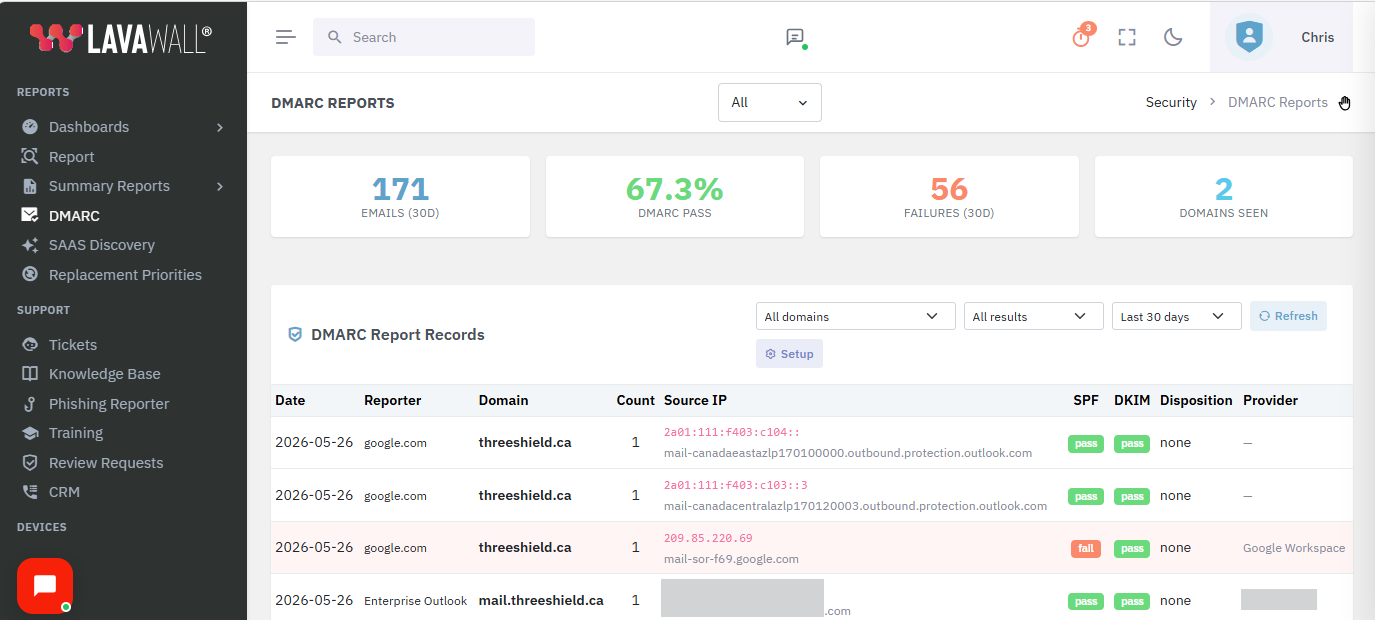
Every report Lavawall receives rolls up into a live dashboard for the active company — total volume, DMARC pass rate, recent failures, and how many of your domains are being seen in the wild.
A managed receiver — no XML, no mailbox to babysit
Most DMARC headaches start with where do the reports even go? With Lavawall, each company gets its own dedicated receiving address — for example yourcompany@dmarc.lavawall.com. You add it as the rua= destination in your DMARC record, and that’s it.
- We receive the aggregate reports, decompress and parse the XML, and store every record against the right company and domain.
- No shared inbox to monitor, no scripts to run, no XML to open.
- Your receiving address is unique per company, so an MSP can stand up DMARC for every client without collisions.
- Optionally restrict which sending domains a company will accept reports for, so stray reports are ignored.
The automatic DMARC configuration system
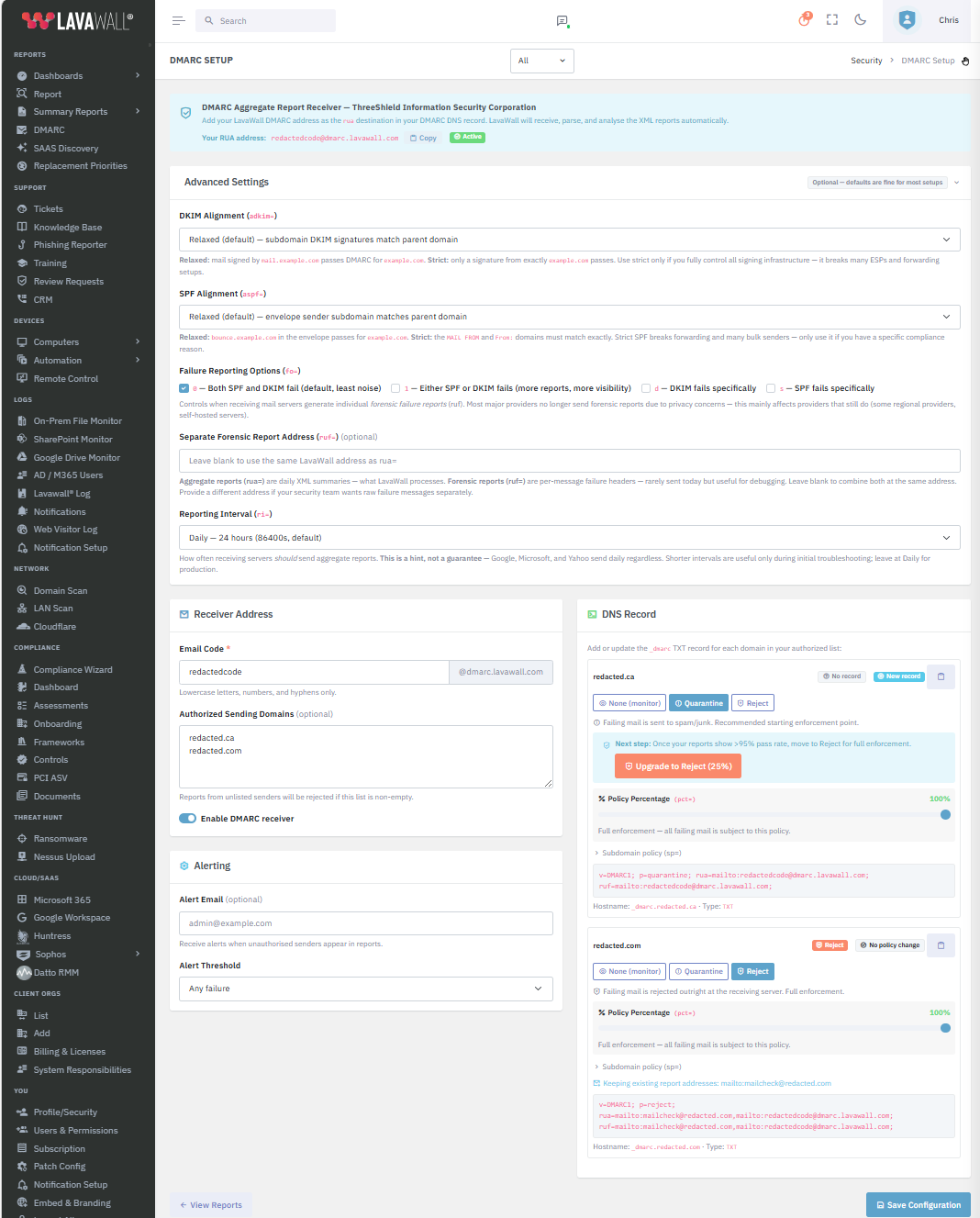
This is where Lavawall earns its keep. For every domain it knows about, the configuration system reads the live _dmarc record in DNS, shows you exactly what is published today, compares it to what should be there, and gives you one-click safe progressions to the next policy. You never edit a DMARC record by hand again.
What the per-domain card actually does for you:
- Live DNS drift detection. Lavawall reads the published
_dmarcTXT record over DNS and compares it to what should be there. If they match, you see a green “Record up to date” badge. If they don’t, the card highlights the gap so you know exactly which domains still need publishing. - Three-button policy toggle. None → Quarantine → Reject, each with a plain-language description of what will happen to failing mail. The button highlighted in primary color is the policy currently selected.
- Per-domain percentage (
pct=) slider. Drag from 0 to 100% and the generated TXT record updates live below the slider. No editing DNS tags by hand. - One-click safe progressions. A domain still on
p=nonegets a recommended action: Set to Quarantine (10%). A domain already on quarantine and passing cleanly gets Skip to Reject (25%). The buttons set the policy, set the percentage, and update the record — in one click. - Subdomain policy (
sp=). Per-domain control over what happens to subdomains, expandable when you need it and out of the way when you don’t. - Non-destructive merge. If you already have other DMARC report addresses in your
ruatag — for example Cloudflare’sdmarc-reports.cloudflare.net— Lavawall keeps them, adds its own address alongside, and tells you it’s doing so. No surprise downgrade of your existing reporting. - Live TXT-record preview. The exact string to publish appears below the slider, with the hostname (
_dmarc.example.com) and a one-click copy. Your DNS person doesn’t need to interpret anything. - Color-coded status badges at the top of every card — current policy plus a Record up to date / No policy change / Update needed indicator — so you can scan a long list of domains and immediately see what’s deployed and what’s pending.
Already at p=none and unsure how to move?
Most domains stall at monitor. Lavawall removes the guesswork — one click suggests the safe next step, writes the TXT record, and merges with whatever you already have.
Every sending source — identified
A raw IP address tells you nothing. Lavawall enriches each source it sees in your reports so you can actually make a decision about it:
- Reverse DNS (rDNS) name for the sending host.
- Provider / ESP identification — Lavawall categorises known senders (your mail platform, marketing and CRM services, transactional mail providers) so legitimate infrastructure is obvious at a glance.
- Volume and pass rate per source, plus how many of your domains it has touched, and when it was first and last seen.
The result: the difference between “a legitimate marketing platform we forgot to authorise” and “a host in another country spoofing our invoices” takes seconds to tell apart, not an afternoon of WHOIS lookups.
Decide once — for every report from that source
When you recognise a source, you mark it. Lavawall records an analyst decision for each sending IP — authorized, phishing, suspicious, or ignore — with an optional note, who set it, and when. That gives you a clean, auditable record of which sources you’ve already triaged so you’re never re-investigating the same IP twice.
Those decisions don’t live in a silo. The same source intelligence feeds the wider Lavawall® reputation system shared with the Outlook Phishing Reporter and cloud breach detection — so a host you flag as phishing in your DMARC reports is context everywhere else, too.
Finds your domains automatically
You shouldn’t have to type your domains in by hand. When a company is connected to Lavawall, the DMARC configuration system auto-populates the domain list from everything it already knows about that tenant:
- Microsoft 365 verified custom domains.
- Google Workspace primary domain.
- Domains already linked through the Scout domain scanner.
- Domains recorded against the company in Lavawall.
Each source is gathered independently, so a gap in one place never hides the domains found elsewhere. New domains you type in are picked up automatically and their live SPF/DMARC records are fetched for you — you instantly see a per-domain configuration card for the new one.
Alerts when an unauthorized sender appears
Set an alert address and a threshold — any failure, or 5+, 10+, or 50+ — and Lavawall tells you when unauthorised senders start showing up in your reports for a domain. You find out a spoofing campaign is using your name from a notification, not from an angry customer.
Security first
The DMARC console is part of the same hardened Lavawall® platform as the rest of your security tooling. Some of the controls in place:
- Authentication required — every DMARC page and API action requires a logged-in session.
- Strict tenant authorisation — every request is checked against the company you’re allowed to act for (your own company or a child company you manage); access to any other tenant is denied.
- Per-tenant data isolation — one organisation’s reports, configuration, and receiving address are never visible to another.
- Parameterised database access throughout, with server-side validation of IP addresses, domains, decision values, and receiving codes.
- Unique receiving codes — no two companies can claim the same
@dmarc.lavawall.comaddress. - Role-based access to the console and a full audit trail of who triaged which source, and when.
Built for MSPs — multi-tenant by design
Every Lavawall® tenant gets its own isolated DMARC pipeline: its own receiving address, its own report data, its own per-domain configuration cards. MSPs run DMARC for every client from a single console, switching active company in a click, while each client’s data stays strictly separated. The same multi-tenant architecture behind our remote support, compliance, and breach-detection tools extends to DMARC — no separate deployment per client, no data leaking between tenants, no per-domain SaaS subscription stacking up.
What Lavawall gives you that other tools don’t
Microsoft 365 and Google Workspace let you publish a DMARC record, but neither gives you a dashboard that reads the aggregate reports back to you. Free and basic viewers parse reports but rarely add source triage, an automatic configuration system, domain discovery, or multi-tenant management. Here’s how Lavawall® compares:
| Capability | Lavawall® DMARC | Microsoft 365 / Google Workspace (native) | Standalone DMARC analyzer (typical) |
|---|---|---|---|
| Receives & parses aggregate (rua) report XML for you | ✅ Managed receiver, automatic | ❌ Publish only — no report dashboard | ✅ |
| Plain-English pass/fail dashboard (7 / 30 / 90 days) | ✅ | ❌ | ✅ |
| Per-source-IP identity (rDNS + provider / ESP category) | ✅ On every source | ❌ | ✅ Most |
| Analyst decision per source (authorize / phishing / suspicious / ignore) with audit trail | ✅ Built in, attributed & timestamped | ❌ | ⚠️ Varies / limited |
| Automatic per-domain configuration card with live-DNS drift detection | ✅ “Record up to date” badge | ❌ | ⚠️ Most show recommended record, fewer compare to live DNS |
| One-click safe progressions (Set to Quarantine 10%, Skip to Reject 25%) | ✅ | ❌ | ⚠️ A few offer guidance; most leave you to edit by hand |
Live pct= slider with live TXT-record preview | ✅ | ❌ | ⚠️ Limited |
| Non-destructive merge with existing 3rd-party reporters (e.g. Cloudflare) | ✅ Preserves your existing addresses | ❌ | ⚠️ Some overwrite |
| Auto-discovers your sending domains from connected M365 / Google Workspace | ✅ | ❌ | ❌ Usually manual, per domain |
| Unauthorised-sender alerting with thresholds | ✅ | ⚠️ Limited | ✅ |
| Live SPF + DMARC DNS checks & per-domain pass rate | ✅ | ❌ | ✅ |
| Multi-tenant MSP console with per-tenant isolation | ✅ Native | ❌ | ⚠️ Partner / add-on tier |
| Source reputation shared with phishing reporter & breach detection | ✅ | ❌ | ❌ |
| Bundled in a wider security / GRC / RMM platform | ✅ Not a separate per-domain subscription | — | ❌ Standalone, often priced per domain |
Lavawall® vs native Microsoft 365 / Google Workspace
Microsoft 365 and Google Workspace let you publish a DMARC record. Neither provides a dashboard that reads the aggregate XML reports back to you. To actually see who’s sending email as your domain and to safely move from p=none to p=reject, you need a DMARC report receiver and analyzer — Lavawall is that, integrated with the rest of your security tooling.
Lavawall® vs Dmarcian
Dmarcian is one of the longest-established dedicated DMARC platforms and a strong choice if you want deep DMARC-only specialisation, a large knowledge base, and the option of consulting services. Lavawall® DMARC is part of a wider multi-tenant security platform (breach detection, phishing reporter, file integrity monitoring, GRC) rather than a standalone DMARC product. If you mainly need DMARC visibility, automatic configuration, and safe enforcement integrated with the rest of your security tooling — especially across many client tenants — Lavawall is built for that. If your organisation has settled on DMARC-only management as a discipline and wants deeper add-ons (BIMI consulting, hosted SPF/DKIM management), Dmarcian is a fair comparison.
Lavawall® vs Valimail
Valimail focuses heavily on enterprise hosted SPF and DKIM management (its “Enforce” service) with named-sender authorisation as a core workflow, and offers strong BIMI support. Lavawall® DMARC takes a more operational view: read the reports, identify every sender, mark them, and step each domain up to reject with one click — without taking over hosting of your SPF or DKIM records. For organisations that want their DNS to stay where it is and a guided per-domain enforcement workflow they can hand to junior analysts or MSP technicians, Lavawall fits cleanly. For very large enterprises that want a vendor to take operational ownership of their SPF/DKIM through a hosted system, Valimail is the established option.
Lavawall® vs EasyDMARC
EasyDMARC has built a strong reputation for clean, accessible DMARC management UI with hosted DMARC, SPF, and DKIM record options and a good MSP partner program. Lavawall® DMARC overlaps in MSP-friendliness and ease of use but bundles DMARC into a broader security platform (breach detection, phishing reporter, helpdesk, GRC) so you aren’t running a separate per-domain DMARC subscription alongside everything else. If DMARC is the single thing you want a tool for and you don’t need integrated breach detection or file monitoring, EasyDMARC is a fair pure-play comparison.
Lavawall® vs Red Sift OnDMARC
Red Sift OnDMARC (now part of the broader Red Sift platform) is a polished DMARC service with strong BIMI support, MTA-STS and TLS-RPT reporting, and brand-protection features. Lavawall® DMARC concentrates on visibility, automatic configuration, and safe enforcement with deeper integration into a wider security and IT operations platform. If you specifically need BIMI/VMC, MTA-STS, or TLS-RPT alongside DMARC, Red Sift remains a leader in that adjacent territory. If you want DMARC integrated with the rest of your security stack and managed across many client tenants from one console, Lavawall is built for that.
Lavawall® vs Proofpoint Email Fraud Defense
Proofpoint Email Fraud Defense is enterprise-grade DMARC with global threat-intelligence enrichment and deliverability consulting, and pairs naturally with Proofpoint’s email security gateway. It carries enterprise pricing to match. Lavawall® DMARC delivers the practical core — automatic XML parsing, per-source identification and decision workflow, automatic per-domain configuration, multi-tenant management — without enterprise pricing or a gateway dependency. MSPs and lean IT teams that already run their email security elsewhere typically find Lavawall a better operational fit.
Lavawall® vs Mimecast DMARC Analyzer
Mimecast DMARC Analyzer (originally DMARC Analyzer, acquired by Mimecast) integrates DMARC reporting with Mimecast’s broader email security suite. If you’re already on Mimecast for inbound email security and want DMARC inside the same console, that integration is the natural fit. Lavawall® DMARC is gateway-independent — it works whether your inbound mail is filtered by Microsoft Defender, Mimecast, Proofpoint, Cisco, Barracuda, or anything else — and integrates with the rest of the Lavawall security platform instead.
Where a dedicated DMARC platform may still win
We aim to be honest. If your single requirement is deep, standalone DMARC-as-a-service, purpose-built platforms such as Dmarcian, Valimail, EasyDMARC, Red Sift OnDMARC, Proofpoint Email Fraud Defense, and Mimecast DMARC Analyzer are excellent and offer add-ons Lavawall doesn’t focus on — for example BIMI / VMC logo programs, MTA-STS and TLS-RPT reporting, fully hosted SPF/DKIM/DMARC record management with SPF “flattening,” and very large global threat-intelligence networks with dedicated deliverability consulting. Lavawall® concentrates on the part most teams actually get stuck on: turning the reports into safe enforcement, integrated with the rest of your security stack and managed across every tenant from one place. Many organisations — and most MSPs — find that’s exactly the gap they need filled.
How it works — in four steps
@dmarc.lavawall.com address into the rua= tag of each domain’s DMARC record — or let the automatic configuration system generate the whole record for you, merging with any reporters already there.What’s included
Lavawall® DMARC Monitoring ships with:
- A dedicated, managed DMARC aggregate-report receiver (one address per company)
- Automatic XML ingestion, parsing, and storage
- Pass/fail dashboard with domain, result, and date filters
- Per-source identification (rDNS + provider category) and a decision workflow with audit trail
- Automatic per-domain configuration system with live-DNS drift detection, three-button policy toggle, percentage slider, one-click safe progressions, subdomain policy, and non-destructive merge with existing reporters
- Live
_dmarcrecord preview with hostname and copy-to-clipboard - Automatic domain discovery from Microsoft 365, Google Workspace, and Scout
- Unauthorised-sender alerting with thresholds
- Live SPF/DMARC DNS lookups and per-domain pass rates
- Multi-tenant management with role-based access and per-tenant isolation
DMARC Monitoring is part of the Lavawall® email- and domain-security tooling. See pricing for how it fits your tier, or talk to us about rolling it out across your clients.
Common questions
Do I need a separate tool just to read DMARC reports?
In practice, yes. Microsoft 365 and Google Workspace let you publish a DMARC record, but neither gives you an aggregate-report dashboard. The reports arrive as compressed XML from dozens of providers — a receiver/analyzer like Lavawall turns that into something you can read and act on.
What does the automatic DMARC configuration system actually do?
It reads the live _dmarc TXT record for every domain you’ve added, compares it to what should be there, and gives you a per-domain card with: a current policy badge, a Record up to date / No policy change / Update needed indicator, three policy buttons (None / Quarantine / Reject), a pct= percentage slider that live-updates the TXT-record preview below it, and one-click recommendation buttons such as “Set to Quarantine (10%)” or “Skip to Reject (25%).” The card also shows the hostname (_dmarc.example.com), preserves any third-party report addresses already in your record, and gives you a one-click copy of the final TXT string to publish.
Will Lavawall overwrite my existing Cloudflare DMARC reports?
No. If your record already contains, for example, mailto:<id>@dmarc-reports.cloudflare.net, the automatic configuration system merges Lavawall’s address into the same rua list and tells you it’s doing so (“Keeping existing report addresses…”). Your existing reporting keeps working; Lavawall is added, not substituted.
Will turning on enforcement break my legitimate email?
It can, if you jump to p=reject before you know all your real senders. That’s exactly what Lavawall’s automatic configuration system prevents: discover your domains, see which sources pass and fail, then one-click up with percentage tags (e.g. pct=10, then pct=25) so only a slice of mail is enforced while you watch the reports.
How long until I see data?
Most mailbox providers send aggregate reports daily, so you’ll typically see your first reports within 24–48 hours of publishing the rua address.
What about forensic (ruf) reports?
You can point ruf at the same Lavawall address or a separate one. Note that most major providers no longer send per-message forensic reports for privacy reasons, so the aggregate (rua) data is what drives day-to-day decisions.
Does Lavawall change my DNS for me?
No. The configuration system generates the exact record to publish and preserves your existing tags, but you stay in control of your own DNS — you (or your DNS provider) copy and paste the record. We never need DNS credentials.
Can one MSP run this for many clients?
Yes — it’s multi-tenant by design. Each client has its own isolated configuration, data, automatic configuration cards, and receiving address, all managed from one console.
How is this different from a free DMARC report viewer?
Free viewers typically parse reports but stop there. Lavawall adds source intelligence (rDNS + provider category), per-source analyst decisions with audit trail, an automatic per-domain configuration system with live-DNS drift detection and one-click safe progressions, automatic domain discovery, multi-tenant management, and integration with the rest of a security platform (phishing reporter, breach detection).
Common DMARC terms
- DMARC
Domain-based Message Authentication, Reporting, and Conformance. The standard that tells receiving mail servers what to do when a message claiming to be from your domain fails SPF and DKIM authentication, and asks them to send back daily aggregate reports.
- rua (aggregate report)
The XML report a receiving server sends each day to summarise authentication results for messages that claimed to come from your domain. Delivered to the address in the
rua=tag of your DMARC record. This is what Lavawall ingests automatically.- ruf (forensic / failure report)
Per-message failure report including (where supported) the original message. Most major providers no longer send these for privacy reasons.
p=(policy)What you ask receivers to do with failing mail:
none(deliver, just report),quarantine(send to spam),reject(refuse outright at the receiving server).pct=(policy percentage)What share of failing mail to enforce.
pct=10enforces only 10% of failing mail; the rest is delivered as if the policy were one step lower. Used for safe gradual rollouts. Lavawall’s configuration system suggestspct=10when moving to quarantine andpct=25when moving to reject.sp=(subdomain policy)A different policy for subdomains than the parent domain. Useful for staging or marketing subdomains that need different treatment.
adkim/aspf(alignment)Whether DKIM/SPF must align strictly (
s) or can be relaxed (r) to the From: domain. Relaxed is the safe default for most setups.fo=(failure-reporting options)When forensic (ruf) reports should be generated. Default
0means “both SPF and DKIM fail.”- DKIM
DomainKeys Identified Mail. A cryptographic signature added to each outbound message that proves it came from your domain.
- SPF
Sender Policy Framework. A DNS record listing the IPs allowed to send mail for your domain.
- BIMI
Brand Indicators for Message Identification. Displays your brand logo in supporting mailbox clients (Gmail, Apple Mail) once DMARC enforcement is in place. Lavawall doesn’t directly manage BIMI; dedicated DMARC platforms typically do.
- MTA-STS & TLS-RPT
Adjacent email-transport security standards: MTA-STS asks senders to use TLS when delivering to your domain, and TLS-RPT collects reports on TLS failures. Often bundled with dedicated DMARC services.
Related reading
- What are SPF, DKIM, and DMARC? — the plain-English explainer.
- Phishing Reporter for Outlook — per-email SPF/DKIM/DMARC analysis at the moment a user reads a message.
- Free Scout domain scan — check your domain’s SPF and DMARC posture in seconds.
- Microsoft 365 / Entra breach detection — shares the same source reputation.
- Lavawall vs KnowBe4 PhishAlert — for the email-security awareness side.
- Lavawall for MSPs — multi-tenant management for client tenants.
Support
Evaluating DMARC for your organisation or rolling it out across clients? Reach out:
- Email and web form: contact.php — typical response within one business day
- Phone (Alberta): 1-403-538-5053
- Phone (British Columbia): 1-778-731-1339
- Phone (Ontario): 1-289-724-8829
- Phone (United States): 1-406-988-7333
Stop spoofers using your domain.
DMARC monitoring + automatic per-domain configuration, integrated with the rest of your security stack. Multi-tenant. No per-domain subscription.
If you have any questions or need further assistance, feel free to reach out through our chat, phone, or email on our contact page!